
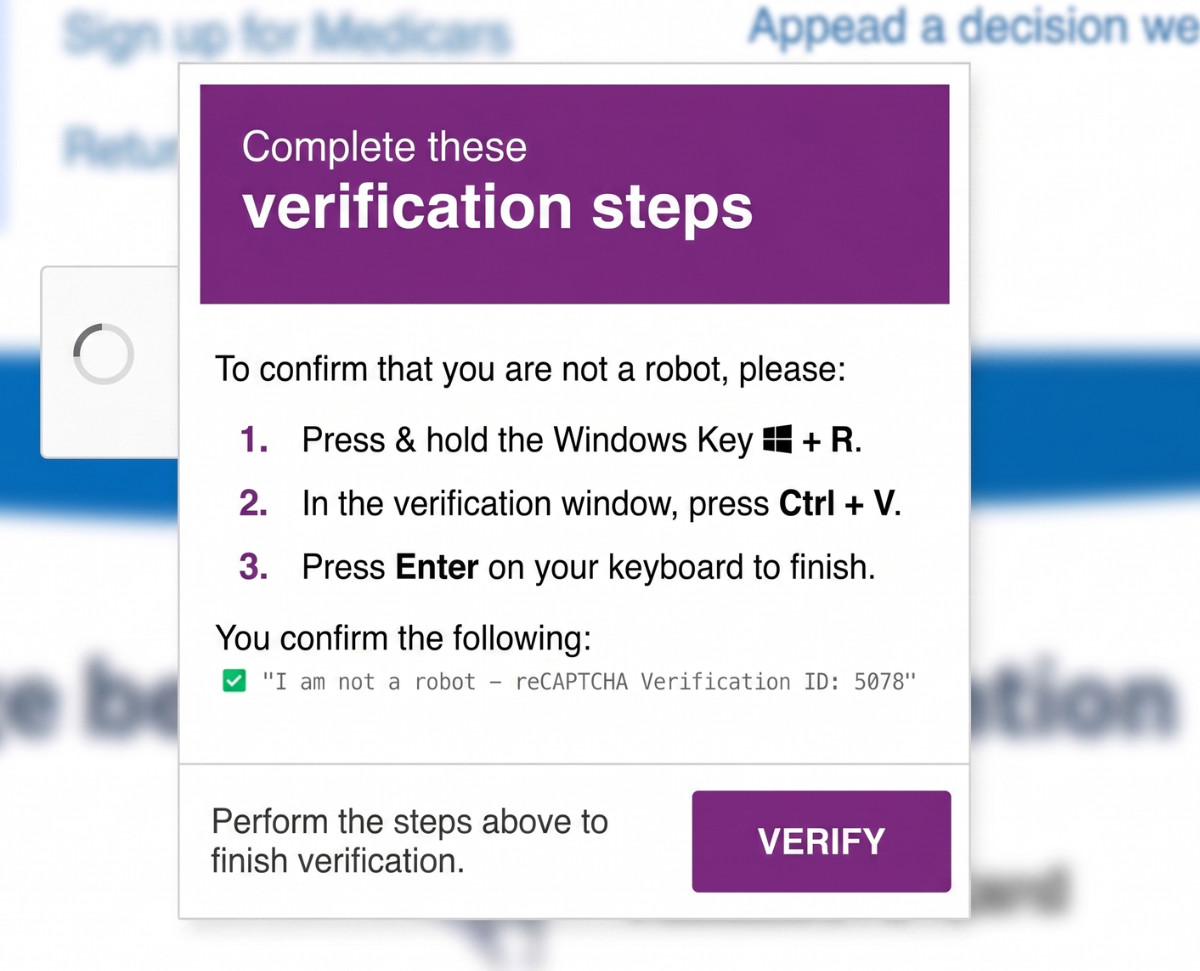
CAPTCHAs (Completely Automated Public Turing test to tell Computers and Humans Apart) have become background noise on the internet. You know the routine: squint at distorted text, click on traffic lights, drag puzzle pieces, rotate images; jump through a few hoops just to prove you’re human. It’s tedious, but we’ve all accepted it as part of staying safe online.
So, when a page asks you to “verify you’re human,” it barely registers as suspicious. That's where ClickFix comes in.
ClickFix is the term for the social engineering trick where attackers convince people to install malware on their own devices. ClickFix doesn’t rely on fear or urgency, it works by looking completely ordinary. The pages mimic familiar experiences, like CAPTCHAs or Cloudflare-style checks. People often land on these pages through phishing emails, malicious ads, compromised websites, or even fake job listings.
Behind the scenes, though, something subtle is happening. When you click a button, the site can quietly copy content to your clipboard, just like a normal “Copy” button would. But instead of what you expect, it copies something malicious. So, when you click “Verify,” “I’m not a robot,” or even “Apply,” you may be unknowingly copying harmful commands. In some cases, you’re even told to copy text yourself, except what gets copied isn’t what you see.
Once the content has been copied to your clipboard, the page updates with a set of simple instructions, such as:
- Press Win + R (to open the Run dialog)
- Press Ctrl + V (to paste the command from your clipboard)
- Press Enter (to execute it)
Some variations may use different shortcuts, like Win + X, but the goal is the same: get you to run the command.
Here’s the dangerous part: the moment you press Enter, the command runs silently. No warnings, no pop-ups. The malware downloads and installs immediately, often bypassing security tools because you unknowingly executed it yourself.
From there, infostealer malware goes to work, harvesting saved passwords, autofill data, login cookies, and even sensitive data like password manager vaults or crypto wallets. It may also pull in additional malware. What makes it worse is how invisible it is. Your device looks normal while attackers quietly access your accounts and data.
So how can you stay safe from a ClickFix attack?
Real CAPTCHAs are simple and stay inside your browser: clicking images, dragging items, or ticking a box. They will never ask you to leave the page or run commands on your computer in tools like Run, PowerShell, Terminal, or Command Prompt.
If you think you have encountered a ClickFix scam you should:
- Close the tab immediately
- Clear your clipboard by copying harmless text to overwrite the malicious commands
- Never paste or run commands you don’t understand
ClickFix scams rely on a small moment of trust: one click, one paste, one command. If a website asks you to do something on your device that feels unusual or you do not understand, stop and walk away.
Need help with your IT? TechMan provides friendly, expert IT support for homes and small businesses across the Kāpiti Coast, Wellington and Levin.
Get in Touch →